
Most conversations about online booking for home service businesses start from the wrong place. They assume that booking means putting a calendar on the website and letting customers pick a time slot. For some home service businesses, that is exactly right. For most, it is not even close to what the operation can support or what the customer actually needs to do before any appointment can be confirmed.
The right online booking solution for a home service website is the one that matches how the business actually operates, what information the business needs before it can commit to a visit, and what the customer is trying to accomplish when they land on the site. Before deciding how customers should book, the website needs to make basic service information easy to find, service areas clear, and the next step obvious. Our post on what every contractor website should include covers that foundation. This post covers the booking and enquiry functionality that sits on top of it.
What Customers Actually Need to Do
A homeowner contacting a home service business is not always ready to book immediately. Some have an urgent problem that needs resolving today. Others are comparing two or three contractors over the course of a week before making a decision. Others are planning a project months out. What these different customers have in common is that they are trying to answer the same three questions quickly when they arrive at the website.
Can you help with my problem? The customer needs to confirm the business handles their specific service before they invest time in an enquiry. A website that lists "home services" without specifying which trades it covers forces the customer to call to ask a qualifying question. That friction costs enquiries.
Do you serve my area? A customer outside the service area who fills in a booking form and receives no response has had a bad experience with a website that did not tell them they were out of range. Clear service area information on the booking page itself, not buried in an about page, prevents this.
What happens after I submit a request? The customer wants to know whether someone will call them back in an hour or a day, whether they will receive a confirmation, and whether submitting a request means they are committed to anything. A booking experience that does not answer these questions produces enquiries from customers who are uncertain and hesitant rather than engaged and ready to proceed.
Once a website answers these three questions clearly, the booking or enquiry process itself becomes far less contentious. The customer who knows what they are getting into before they submit is more likely to complete the form, more likely to answer a follow-up call, and more likely to convert into a paying job.
What Should the Customer Actually Be Able to Book?
The appropriate website action is different for every trade, and getting this right is the most important decision before building any booking functionality. A real-time calendar that lets customers pick a time slot is the right solution for some home service businesses and completely wrong for others.
The pattern across all six trades is consistent: the right website action is the one that matches what the business can actually commit to before a site visit. When the website action and the business reality are aligned, the customer has a good experience regardless of whether they fill in a form, request a callback, or select a time slot. When they are misaligned, the business receives enquiries it cannot fulfill and the customer is frustrated before the relationship has even started.
Stage 1: The Smart Quote Request Form
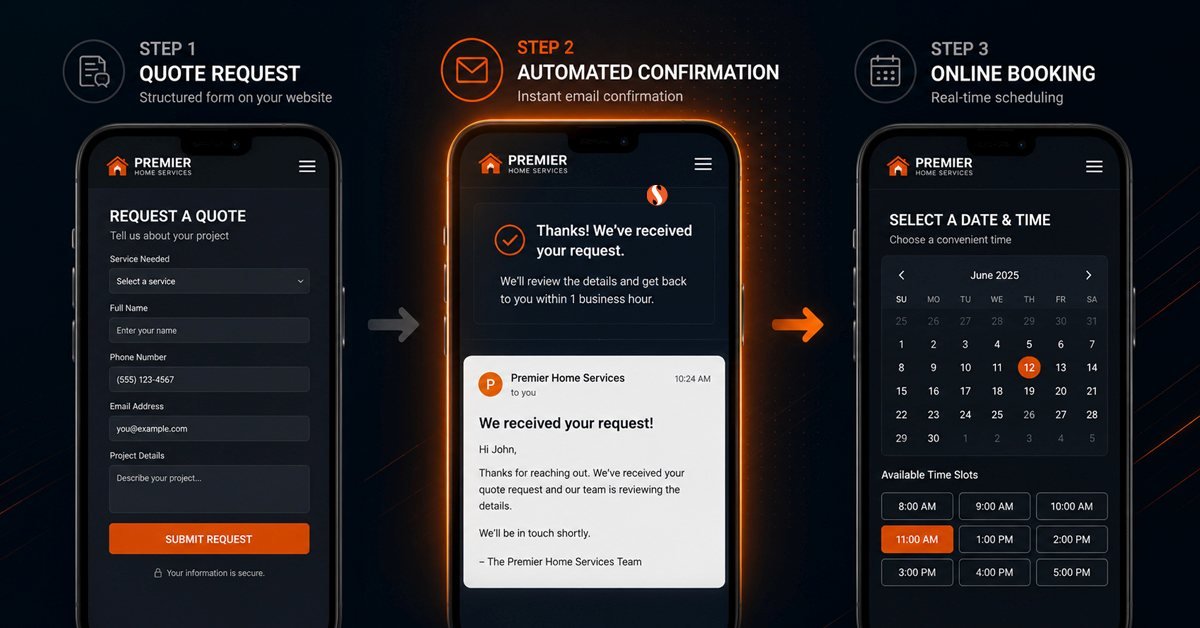
For many contractors, "online booking" really means giving customers a structured way to request service online, not allowing them to reserve a calendar slot instantly. That distinction matters because it changes what the website actually needs to do. The most important insight in this post is this: online booking does not necessarily mean putting a calendar on your website. For most home service businesses, the better first step is a properly designed quote request form. Not a contact form. A structured form that collects the specific information the business needs to respond with something useful.
The difference between a contact form and a smart quote request form is not cosmetic. A contact form with three fields (name, email, message) gives the business almost nothing to work with. Someone calls back, asks four qualifying questions, and only then can they confirm whether they can help, when they can come, and roughly what it will cost. The phone call happens regardless. The form did not reduce friction. It just moved the qualifying conversation from the website to a callback.
A smart quote request form collects enough structured information that the business can respond with a meaningful first contact rather than an opening question.
The form itself is only part of Stage 1. The other part is what happens immediately after submission. The customer needs an instant confirmation that tells them the form was received, what happens next, and when to expect contact. A submission that disappears into silence is a lead that calls a competitor the next morning.
Stage 2: Form Plus Workflow
Stage 2 is often the practical next step for home service businesses that have outgrown a basic enquiry form. It is the smart quote request form from Stage 1 connected to an automated workflow that handles the communication that currently falls on whoever happens to be available to answer the phone or check the inbox.
The workflow does not replace the human relationship. The estimator still calls the customer. The technician still shows up. What the workflow handles is the administrative communication that happens between submission and the first real conversation, and between the appointment being confirmed and the technician arriving.
The business case for Stage 2 is straightforward. An enquiry that comes in at 9pm on a Sunday and receives an automated confirmation with a stated response timeline keeps the customer engaged until Monday morning. The same enquiry with no confirmation produces a customer who calls three other contractors before Monday and books with whoever answers first. Stage 2 does not require scheduling software, a CRM, or any platform integration. It requires a properly configured form and automated email workflows. The implementation is within the website itself, not dependent on third-party subscriptions the business has to manage separately.
Stage 3: Scheduling Integration
Stage 3 is where the website becomes the entry point into an existing scheduling or job management system. The website collects the initial request and passes it directly into software that handles availability, technician assignment, dispatch, and job tracking. The customer may see real-time availability and select a time slot on the website itself. The business sees the booking appear in their scheduling system without manual data entry.
This is Jobber, ServiceTitan, Housecall Pro territory. The website is the front end. The platform is the back end. Sentinel Infotech builds the website and the integration layer, the part that connects the website's booking form to whatever job management system the contractor uses. We do not build the scheduling platform itself, and we do not recommend one platform over another. What we build is the website experience that feeds into it cleanly.
When a Simple Form Is Enough
A sole operator running two trucks and personally answering every call does not need a workflow automation system. They need a quote request form that sends them an SMS when someone submits, collects the right information, and sends the customer a confirmation. Building anything more complex than that creates maintenance overhead for a business that does not have the volume to justify it.
If the owner personally handles every enquiry, has a relatively small number of weekly jobs, and schedules everything from a personal calendar, Stage 1 is usually the right answer. The form should be well-designed and collect the right information. The confirmation should be immediate and informative. Beyond that, the additional automation of Stage 2 solves a problem the business does not yet have.
The signal that Stage 1 is no longer enough is not a specific number of enquiries. It is when the owner or office staff starts missing follow-ups, when enquiries are falling through the gap between receipt and callback, or when the business is losing customers to competitors who respond faster. At that point Stage 2 solves the problem. Building Stage 2 before that point adds complexity without adding revenue.
When You Actually Need Scheduling Integration
A contractor running multiple technicians across a metropolitan area, handling a high volume of enquiries, and using job management software for dispatch, invoicing, and technician tracking has a genuine case for Stage 3. The volume of manual coordination is itself a cost, and the scheduling integration reduces that cost measurably. The website becomes part of the operational system rather than a marketing presence that generates leads for a separate manual process.
The practical trigger for Stage 3 is when manual booking coordination is consuming several hours of staff time every day and has become a measurable operational bottleneck. At that point the cost of the integration and the ongoing subscription to a job management platform is justified by the time it returns to the operation. Until it reaches that point, Stage 2 typically handles the same workflow at a fraction of the cost and complexity.
What a Good Home Service Booking Experience Looks Like
Regardless of which stage a business is at, the customer-facing booking experience has consistent requirements. A customer who cannot answer these questions within two minutes of landing on the website's booking page will not complete the form.
Service area is confirmed before the form is reached. A customer who fills out a detailed form and then receives a "sorry, we don't serve your area" response has had a bad experience. The service area should be visible on the booking page itself, not requiring navigation elsewhere. A postcode lookup field at the top of the form that confirms coverage before the customer completes anything is the cleaner implementation.
The form works on a phone without friction. Most home service enquiries come from mobile devices, often from someone standing in front of the problem they need fixed. A form with small tap targets, horizontal scrolling, or a file upload that does not connect to the phone's camera roll loses the enquiry at the submission stage. The booking experience needs to be built mobile-first regardless of how it looks on a desktop.
The confirmation answers the questions the customer still has. After submitting a request, the customer wants to know that the form worked, what happens next, and when. A confirmation that says only "thank you, we'll be in touch" leaves the customer uncertain. A confirmation that says "your request has been received and someone will call you within two business hours" gives the customer something to hold the business accountable to. That specificity also reduces the calls asking "did you get my message?"
The booking page does not make promises the business cannot keep. A roofing company that shows an online calendar implying same-day or next-day availability is creating expectations it cannot fulfill for most jobs. The customer who selects a time slot and receives no confirmation, or receives one followed by a rescheduling request, has had an experience worse than if they had simply called. The booking page should represent what the business can actually deliver, not what looks impressive in a demo.
Business Situation vs Best Website Approach
| Business Situation | Recommended Approach | What to Build |
|---|---|---|
| Solo operator, personally handles enquiries and scheduling | Stage 1: Smart quote request form | Structured form with SMS notification and auto-confirmation email |
| Small team, missing follow-ups, losing enquiries after hours | Stage 2: Form plus workflow | Quote form with automated confirmation, routing, and appointment reminders |
| Emergency trades: plumbing, locksmith, electrical fault | Stage 2 with urgent path | Urgent request form that triggers immediate notification alongside standard enquiry form |
| Jobs requiring site visit before pricing: roofing, general contracting | Stage 1 or 2: Inspection request only | Request form that sets expectation of inspection visit, not instant booking |
| Predictable recurring services: cleaning, lawn care, pest control | Stage 3: Scheduling integration | Service selector with real-time availability and calendar booking |
| Multi-technician operation with high enquiry volume | Stage 3: Full scheduling integration | Website front end integrated with job management platform |
| Mixed business: some jobs schedulable, some requiring estimates | Stage 2 with two distinct paths | Separate form flows for routine service requests and estimate requests |
| Business with existing job management software already in use | Stage 3: Integration with existing platform | Website booking form connected to existing software via API or webhook |
When Online Booking Is the Wrong Solution
Some home service businesses should not build a booking system at all, and some should defer it until other foundations are in place.
When the job cannot be scoped without a visit. A general contractor whose minimum project is a bathroom renovation does not have a booking problem. They have a consultation problem. The right website action is a consultation request that collects enough information for a meaningful first conversation, not a booking form that implies the contractor can confirm anything before seeing the project. Building a booking system for a business where every job starts with a site visit and a scoping conversation creates a mismatch between what the website promises and what the customer actually experiences.
When the website itself is not yet generating traffic. A booking system on a website that nobody visits solves the wrong problem. If visitors are arriving but not turning into enquiries, the issue is more likely the website's conversion path than its booking functionality. Our post on why contractor websites get traffic but no calls covers that problem in detail. The priority is getting qualified visitors to the site in the first place, through local SEO, service area pages, and the content that answers the questions homeowners are searching for. A well-configured quote request form is the right first step, not a scheduling integration. The scheduling integration earns its cost when there is enough volume to justify it.
When the operation cannot support the response commitment. An online booking system that implies a specific response time or availability and then does not deliver it is worse than no booking system at all. A contractor who cannot reliably respond within a business day should not build a system that promises two-hour callbacks. The booking experience needs to match what the operation can actually sustain consistently, not what looks impressive on the website.
Frequently Asked Questions
Do home service businesses actually need online booking or is a phone number enough?
A phone number is not enough on its own because customers may want to submit an enquiry when nobody is available to answer the phone. A homeowner whose boiler stops working at 7pm on a Friday may not want to wait until Monday to make contact. They are likely to look for a business that gives them an immediate way to submit their request and get a response. A business with only a phone number captures the enquiries that happen during working hours and loses the rest to competitors who have an after-hours submission option. The bar is not high. A well-designed quote request form with an auto-confirmation email captures the after-hours enquiry and keeps the customer engaged until business hours. That is Stage 1 and it is the minimum viable online booking for most home service businesses. Whether a business needs anything beyond Stage 1 depends on enquiry volume, operational complexity, and whether manual follow-up is already creating a bottleneck.
What is the difference between a booking form and a contact form for a contractor website?
A contact form collects a name, email address, and a message field. It gives the business almost nothing to work with before making the first call. The initial callback becomes a qualifying conversation that could have been handled by the form itself. A booking form (a quote request form, more precisely) collects structured information specific to the trade: service type, location, urgency, preferred time window, and a brief description of the job. It gives the business enough context to make the first call informed and purposeful rather than qualifying. The customer experience is also better because a structured form tells the customer that the business takes their enquiry seriously enough to ask the right questions upfront. A generic three-field contact form on a contractor website signals that the business has not thought carefully about how customers engage with it. The form is often the first real interaction a customer has with the business, and it shapes their expectations of how the rest of the relationship will go.
How do we know when it is time to upgrade from a quote request form to a full scheduling integration?
The practical trigger is when manual booking coordination is consuming meaningful staff time every day and when enquiry volume is high enough that the cost of a scheduling platform and its integration is justified by the time it returns. One practical signal is when someone on the team is spending significant time every day on booking administration, including chasing enquiries, confirming appointments, rescheduling, and managing technician availability across multiple jobs. When the business is not yet experiencing that level of administrative pressure, a well-configured Stage 2 workflow can often handle the same problem at a fraction of the cost. The other signal is when customers start requesting real-time availability information that the current system cannot provide. A cleaning company whose customers repeatedly ask "what time slots do you have available this week" is experiencing a demand for Stage 3 that the current form-based system cannot meet. When that question starts arriving regularly, the scheduling integration conversation is worth having. Sentinel Infotech helps home service businesses assess which stage is right for their current operation before recommending anything to build.
Not Sure What Level of Online Booking Your Business Actually Needs?
Some home service businesses need a well-designed quote request form. Others need automated workflows behind it. A few need a full scheduling integration. The right answer depends on how your operation works today and what it needs to handle tomorrow. We help contractors work that out before recommending anything to build.