
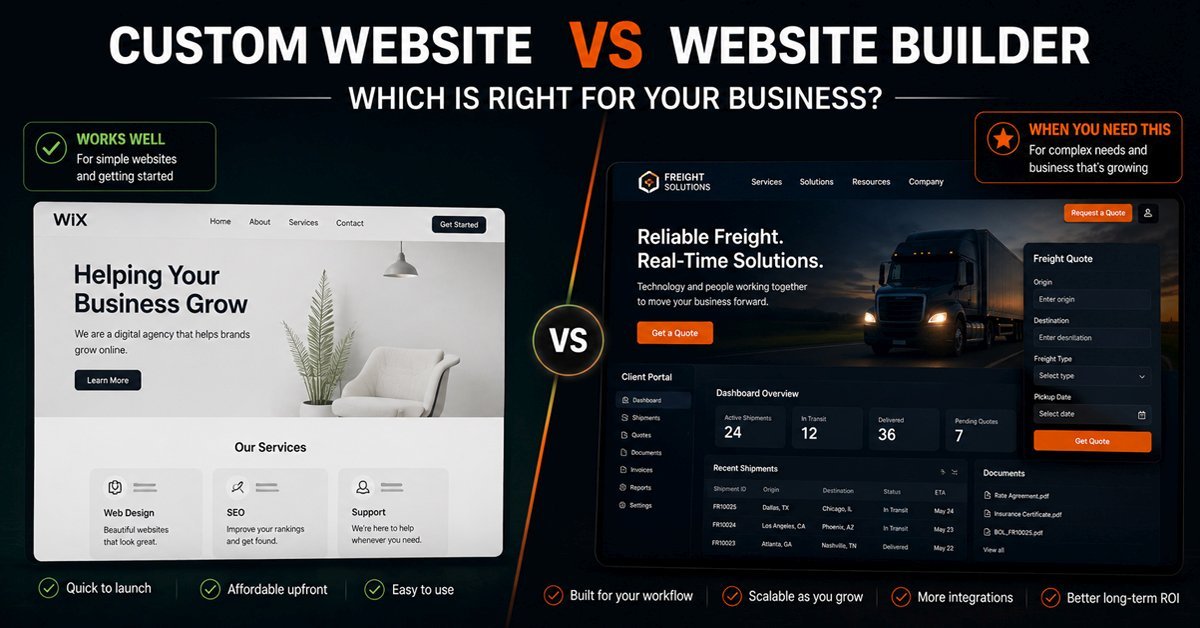
A website builder like Wix, Squarespace, or GoDaddy Website Builder lets a business owner launch a site in a day without a developer. That is genuinely valuable. The design constraints that come with a template are not a problem when the goal is a clean, functional presence. For a freelancer, a local restaurant, a yoga studio, or a startup validating an idea, a website builder is often the most sensible choice available.
The question changes when the business grows. A website builder that served a two-person operation well starts to show its limits when the operation needs a client login area, a booking system that connects to internal scheduling software, a freight quote form that routes enquiries to the right team, or a payment workflow that involves multiple steps and conditions. At that point the constraint is no longer budget or design. It is architecture. And architecture is the one thing a website builder cannot change.
This post is about that transition: what website builders do well, where their limits actually appear, and how to tell whether your business has reached the point where a custom website becomes the practical choice rather than an expensive preference.
What Website Builders Do Well
The case for website builders is genuinely strong for a specific set of situations, and it is worth stating clearly before anything else.
Website builders eliminate the barrier to entry. A business owner who needs a professional presence online today can have one today, without a developer, without a significant budget, and without technical knowledge. The templates are designed by professionals. The hosting is managed. Security updates happen automatically. The result looks credible from day one.
For businesses whose website serves primarily as a digital business card, a portfolio, or a simple information resource, a website builder does that job well. The page loads fast. The contact form works. The site looks professional on any device. There is genuinely no compelling reason to spend significantly more on a custom build to achieve the same outcome.
Website builders have also closed the gap considerably on ecommerce and basic integrations over the past few years. Shopify handles straightforward product sales better than most custom builds would for the same budget. Squarespace handles appointment booking for a service business cleanly. Wix handles restaurant menus and event listings without developer involvement. Within their intended scope, these platforms work well and continue to improve.
Where Website Builders Hit Their Limits
The limits of website builders are architectural, not cosmetic. A template can be changed. An architectural constraint cannot. Understanding where those constraints appear helps a business owner recognise them before they become expensive problems rather than after.
Custom Functionality That the Platform Does Not Support
A website builder offers the features its platform team decided to build. When a business needs something outside that set, the options are using a third-party app from the platform's marketplace, which may not exist for the specific requirement, or accepting that the functionality simply cannot be built. There is no third option. A business that needs a freight quote form with conditional routing, a client portal with role-based document access, or a booking system that connects to a proprietary dispatch platform will not find those features in a Wix or Squarespace app store. They are not there because they were not designed for that scale of operational requirement.
Integration With External Systems
A growing business typically runs multiple systems: accounting software, a CRM, a dispatch or scheduling platform, an inventory system. A website builder can connect to a limited set of these through pre-built integrations. When the integration required is not pre-built, the options are workarounds through tools like Zapier, which adds cost and fragility, or accepting that the connection does not exist. A custom website can be connected to any system through a proper API integration. That connection is stable, maintainable, and does not depend on a third-party tool remaining operational between the website and the system it is supposed to talk to.
Performance Under Scale
A website builder's infrastructure is shared and optimized for typical usage patterns. A site with a large product catalogue, a high volume of concurrent users, or a database-heavy application running behind the public pages will eventually encounter performance limits that the platform cannot resolve. A custom-built site on dedicated or managed hosting can be optimized specifically for the load it actually receives. When a WooCommerce store with thousands of products starts slowing down, the fix involves specific technical interventions. When a Shopify store hits its plan's limits, the options are a higher plan or a different platform.
Data Ownership and Portability
A website on a proprietary builder platform stores its data in that platform's infrastructure. When the business decides to leave, the content can usually be exported but the design, the integrations, and the operational setup cannot. The site has to be rebuilt from scratch on the new platform, and all the configuration work done over months or years does not transfer. A custom WordPress site or a custom-built application is owned entirely by the business. The files, the database, and all the configuration can be moved to any hosting environment at any time, without the platform's involvement or permission.
What This Looks Like in Real Business Situations
The limits above are easier to understand in the context of specific industries and the operational requirements that emerge as those businesses grow.
The Platforms: An Honest Assessment
Not all website builders are identical, and the right comparison is not just "builder vs custom" but which builder or which approach to custom development matches the specific requirement.
The Comparison: What Each Approach Actually Delivers
| Requirement | Website Builder | WordPress | Custom Application |
|---|---|---|---|
| Launch speed | Days, no developer needed | Weeks, developer recommended | Months, developer required |
| Upfront cost | Low, monthly subscription | Moderate, one-time build plus hosting | Higher, reflects complexity of build |
| Design flexibility | Template constraints, limited customisation | High flexibility with the right theme or builder | Complete control, built to specification |
| Custom functionality | Limited to platform app store | Extensive via plugins plus custom development | Unlimited, built exactly as required |
| External integrations | Pre-built integrations only | Wide via plugins and custom API work | Any system via direct API integration |
| Content management | Simple, no training needed | Good, manageable with minimal training | Depends on build, varies widely |
| Data ownership | Platform-dependent, limited portability | Full ownership, portable to any host | Full ownership, complete control |
| Scalability | Platform limits apply | High with proper hosting and architecture | Designed specifically for the load required |
| Ongoing platform cost | Monthly subscription in perpetuity | Hosting only after initial build | Hosting and maintenance after build |
| Technical maintenance | Managed by platform | Requires active maintenance and updates | Requires developer maintenance |
So Which One Is Right for Your Business?
The honest answer is that the best website is the one that matches the stage your business is actually at, not the one that sounds most impressive or the one that costs the most.
A business that is just starting out and needs a professional presence today should use a website builder. The low cost, fast launch, and minimal maintenance overhead are genuine advantages that a custom build cannot match at that stage. Spending significantly more on a custom website before the business has outgrown a builder is not an investment. It is spending money ahead of the requirement.
A business that has outgrown a builder but does not need a full custom application is well served by WordPress, built properly with the right architecture for what it actually needs to do. WordPress with well-structured custom development handles the majority of operational requirements that builders cannot address, at a cost that is sustainable for a growing business.
A business building a product, a platform, or a system where the website itself is the application needs a custom framework, Laravel, a React or Next.js frontend, or a combination. That investment is justified when the business logic and operational requirements genuinely exceed what a CMS can handle, and not before.
We take over websites built on all of these platforms, both to rebuild them and to extend what they can do. The most common pattern we see is a business that stayed on a website builder two or three years longer than it should have, not because they were making a wrong decision at the time, but because the limits appeared gradually rather than all at once. By the time the friction was obvious enough to act on, the workarounds had accumulated and the cost of moving was higher than it would have been earlier.
If you have decided on a custom WordPress build and are now weighing whether to hire an agency or an independent developer, our post on WordPress agency vs freelancer covers exactly that decision.
Frequently Asked Questions
Can I move from a website builder to WordPress without losing everything?
Content can almost always be migrated, including pages, blog posts, and images, though the process varies by platform and requires manual work for most builder-to-WordPress moves. What does not transfer is the design and layout, which needs to be rebuilt on the new platform, and any platform-specific integrations or app configurations, which need to be reconfigured on WordPress with equivalent plugins or custom development. The migration is rarely a simple import. It is typically a rebuild of the site's design and structure using the existing content as a starting point. The practical implication is that the cost of moving is real and should be factored into the timing decision: moving earlier when the site is simpler typically costs less than moving later when there is more content, more configuration, and more integrations to recreate.
Is WordPress a website builder or a custom website?
WordPress sits between the two categories, which is part of why it is the most widely used web platform in the world. It is not a drag-and-drop builder like Wix or Squarespace, but it is also not custom code written from scratch. It is a content management system that can be extended with plugins and custom development to do almost anything a business website needs to do. A WordPress site built by a developer is a custom website in the sense that it is built specifically for that business rather than from a locked template. A WordPress site built by the business owner using a page builder plugin and a pre-made theme is closer to a website builder experience than a custom development engagement. The distinction matters because "WordPress" covers a very wide range of what the end product actually is and how much custom work it involves. Our post on choosing between a WordPress agency and a freelancer covers how to think about the right development approach once you have decided WordPress is the right platform.
How do I know when my business has outgrown a website builder?
The clearest signs are when you are using workarounds to handle things the platform was not designed for: multiple apps cobbled together to approximate a single workflow, manual steps to compensate for the absence of an integration that should exist, or processes your customers should be able to complete online that they currently have to complete by email or phone because the website cannot handle them. A second indicator is when the platform's constraints are affecting design or functionality decisions in ways that compromise how the business presents itself or operates. If you are choosing not to offer an online service because the website builder cannot support it, the builder has become a ceiling rather than a foundation. The practical test is asking whether the website is currently preventing the business from doing something it should be able to do. If the answer is yes, the platform has been outgrown regardless of how good the site looks.
Not Sure Whether Your Business Has Outgrown Its Current Website?
Tell us what your website currently cannot do that your business needs it to do. We will tell you honestly whether the answer is a platform change, a custom build, or something simpler than either.