
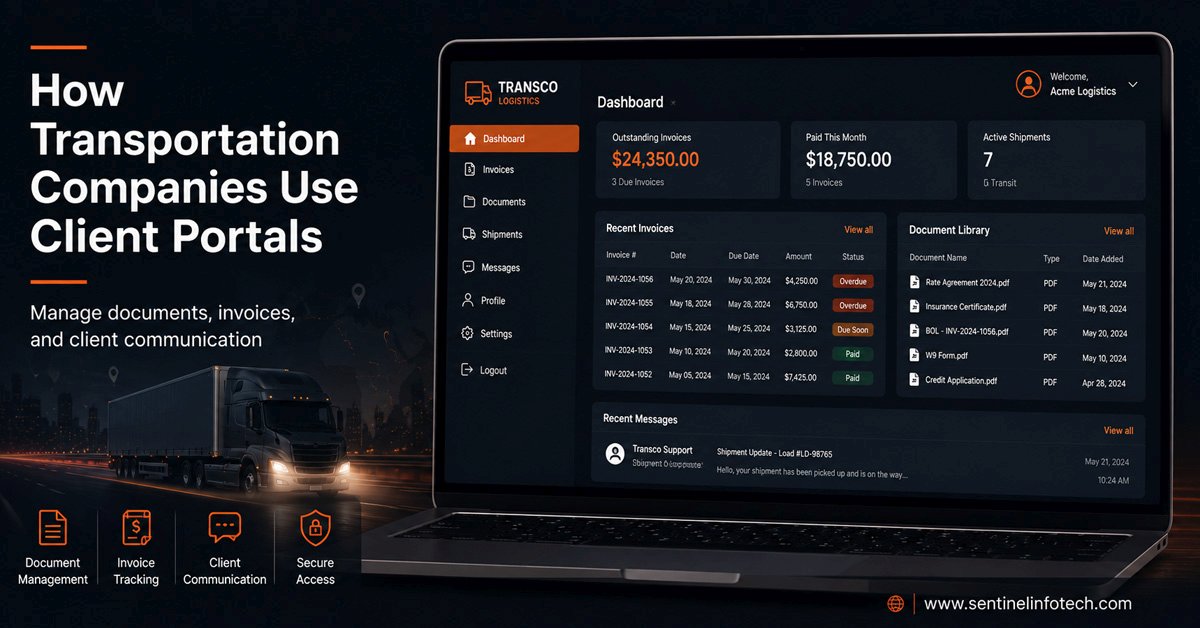
At Sentinel Infotech, we have built web-based systems for transportation companies that needed more than a standard website. Customer portals come up in almost every conversation with a logistics business that has grown past the point where email and phone calls can handle client communication efficiently. The pattern is consistent across companies of different sizes and service types, and the operational impact when a portal is built properly is significant.
This post covers what transportation client portals actually do in practice, how companies structure them based on their specific operations, and what separates a portal that reduces overhead from one that adds a new layer of complexity without solving anything.
What Problem a Transportation Client Portal Actually Solves
The problem is not that transportation companies lack systems. Most have operational software, accounting platforms, and dispatch tools that hold the data their clients need. The problem is that getting that data from the internal system to the client requires a person in the middle.
A client calls to request an invoice from last month. Someone in the office opens the accounting system, exports the invoice, emails it, and sends a follow-up when the client does not receive it. Multiply that by the number of clients, the number of invoices, the number of compliance certificate requests, the number of service history inquiries, and the number of document requests per month, and you start to see where operations staff time actually goes.
A properly built client portal removes that person from the middle. The client logs in, finds their invoice, downloads it, and the operations team never knew the request happened. That is the core value proposition, and for transportation companies with recurring client relationships and regular document exchange, it compounds quickly.
What Transportation Client Portals Typically Include
No two portals are identical because no two transportation businesses operate identically. But the features that come up most consistently fall into a clear set of categories.
Invoice and Billing Access
This is the most common starting point. Clients log in and access invoices for their account directly, filtered by date range, status, or service type depending on how the business bills. For transportation companies running multiple service lines or billing different contacts within the same client organization, the portal handles access control so each contact sees only what is relevant to them.
The administrative side matters as much as the client side. Operations staff upload invoices through a browser interface and assign them to the right client account. No developer involvement, no manual email process. The invoice appears in the client's portal as soon as it is uploaded.
Compliance and Certificate Documents
Transportation clients often need proof of insurance, carrier certifications, safety ratings, and compliance documentation for their own procurement and compliance processes. These requests come in regularly and the documents need to be current. A portal handles this by giving clients direct access to the documents Sentinel assigned to their account, with version control ensuring they always access the most current certificate rather than an outdated one saved from a previous email.
Service History and Account Reporting
Clients with significant shipping or service volumes want visibility into their account history without making it a manual reporting exercise for the transportation company. A portal can surface service history, delivery records, and account summaries filtered by date, route, or service type. For clients who need this data for their own internal reporting, the portal becomes a tool they use regularly rather than occasionally.
Proof of Delivery Documents
For freight and delivery-focused transportation companies, proof of delivery documentation is one of the most frequent client requests. A portal where POD documents are uploaded as they are completed and immediately accessible to the relevant client account eliminates the request-and-email cycle entirely. Clients check the portal when they need confirmation. The document is there or it is not, and if it is not, the client knows to follow up with the driver rather than the office.
Contact and Account Management
Larger transportation clients often have multiple contacts within their organization who need portal access, but with different permission levels. The accounts payable contact needs invoice access. The logistics coordinator needs service history and POD documents. The compliance officer needs certificates. A well-structured portal handles this through role-based access within a single client account, so each contact sees what they need without seeing what they should not.
How Different Transportation Businesses Structure Their Portals
The specific structure of a client portal depends heavily on what the transportation business does and how it bills. Here are the patterns we see most consistently across different operation types.
The Architecture Behind a Transportation Client Portal
Understanding how a portal is built helps transportation business owners evaluate proposals and ask the right questions before committing to a development project. A client portal is a web application with a database behind it, not a feature added to an existing website. That distinction matters for the technology decision.
For most transportation companies, the portal is built as a custom web application using a framework like Laravel and PHP, with a separate front-end layer handling the client-facing interface. WordPress can handle some portal functionality through custom WordPress development, but once the access control requirements become complex across multiple client accounts with different contact-level permissions, a proper application framework gives you cleaner architecture and easier maintenance long term.
The decision between WordPress and a custom web application comes down to the complexity of the business logic. A portal where every client sees the same document types and the permission structure is simple can be built cleanly in WordPress. A portal with per-account permission sets, multiple contact roles, reporting dashboards, and API connections to existing operational systems warrants a custom application from the start.
What Separates a Good Portal from a Complicated One
The portals that reduce operational overhead share a set of characteristics that the ones which add complexity instead of removing it tend to lack.
The admin interface is built for office staff, not developers
A portal that requires a developer to add a new client account, upload a document, or change a permission setting is not operationally useful. The office manager or operations coordinator needs to be able to do all of those things through a browser without technical knowledge. When we build portals for transportation companies, the administrative side gets as much attention as the client-facing side because that is where the daily operational value actually sits.
The client interface is mobile-ready
Clients access portals from wherever they are when they need the information. A client reviewing an invoice from their phone on the road needs the same experience as someone at a desk. Mobile-first design for the client interface is not optional for transportation portals specifically, because the clients of transportation companies are often as mobile as the operators themselves.
Document organization reflects how the business actually works
Organizing documents by category in a way that makes sense to a web developer but not to a transportation operations manager creates a portal nobody uses. The document structure should reflect how the business already organizes and thinks about its records. Invoice clients think about by account and date. Compliance officers think about certificates by type and expiry. Logistics managers think about POD documents by shipment. Building the portal around those mental models rather than arbitrary technical categories is what makes it useful.
Access control is set up properly from the start
Role-based access that was not designed carefully at the architecture stage becomes a maintenance problem as the client list grows. Adding new permission types, changing what a specific contact can see, or handling edge cases where a client changes their internal contact structure all become painful if the access control was bolted on rather than designed in. This is one of the clearest places where working with developers who have built these systems before makes a measurable difference.
Portal vs Standard Website: When the Investment Makes Sense
Not every transportation company needs a client portal from day one. The investment makes sense when the operational overhead of managing client communication manually is measurable and growing with the business.
| Situation | Standard Website | Client Portal |
|---|---|---|
| Small client base with infrequent document requests | Sufficient for the volume | Overbuilt for the need |
| Growing client list with regular invoice and document requests | Starts creating operational bottlenecks | Removes the bottleneck at scale |
| Clients with compliance requirements needing regular certificates | Each request requires manual handling | Clients self-serve, requests disappear |
| Multiple contacts per client with different information needs | All requests go to the same inbox | Role-based access routes information correctly |
| Clients asking for service history or account reporting | Manual export and email process each time | Clients access history directly on demand |
| Operations staff spending significant time on document requests | Time cost grows with client growth | Time cost stays flat as clients increase |
The clearest signal that a portal is worth building is when operations staff are spending measurable time each week handling requests that a portal would handle automatically. For transportation companies where that time is coming from the same people managing dispatch, scheduling, or compliance, the opportunity cost is significant.
What to Think About Before Building a Transportation Client Portal
A few questions that shape the scope and architecture of every portal project we work on with transportation businesses:
Which client requests happen most frequently? The answer determines which features go into version one and which can wait. Building the portal around the highest-volume requests first means the operational impact is immediate rather than theoretical.
Who on your team manages the portal day to day? The admin interface needs to match the technical capability of whoever runs it. An operations coordinator who is not technical needs a different admin experience than a business owner who is comfortable with software.
What does your client list look like in two years? A portal built for twenty clients that needs to handle two hundred is a rebuild if the architecture was not designed for scale. Building for where the business is going, not just where it is, changes several decisions at the design stage.
What data needs to come from existing systems? If invoices are generated in your accounting software, the portal either pulls them via API or requires manual upload. Both approaches work but they have different ongoing maintenance implications. Understanding that dependency upfront shapes the integration design.
Once the portal is live, keeping it running reliably matters as much as building it correctly. Our website maintenance service covers ongoing updates and monitoring for WordPress-based transportation portals after launch.
The transportation industry page on the Sentinel Infotech site covers the full scope of what we build for transportation businesses, including the client portal and document management systems that sit alongside websites, driver portals, and recruiting systems in a transportation web presence.
When Not to Build a Client Portal
The honest answer is that a portal is the wrong investment when the problem it solves is not actually a problem yet. A transportation company with fifteen clients who each request an invoice once a month does not need a portal. The email process works at that volume and the development investment does not pay back quickly enough to justify it.
A portal is also the wrong solution if the underlying data it needs to surface is disorganized in the source systems. A portal built on top of disorganized accounting records or inconsistent document filing practices surfaces that disorganization to clients. The cleanup work that a portal makes visible should happen before the portal is built, not as a consequence of building it.
And a portal built for internal convenience rather than client need will not get used. If the main reason for building it is so the operations team does not have to handle email requests, but the portal does not actually make things easier for clients, clients will continue emailing. The interface and the information architecture need to serve the client first.
Frequently Asked Questions
What is a transportation client portal and how is it different from a website?
A transportation client portal is a secure web application where your clients log in to access account-specific information: invoices, documents, service histories, compliance certificates, and reports relevant to their account. A standard website is publicly accessible and presents the same information to every visitor. A portal is private, login-protected, and shows each client only their own data. The two can coexist on the same domain, with the public website handling marketing and the portal handling operational client communication.
Can a transportation client portal connect to existing accounting or operational software?
Yes, provided the existing software exposes an API or data export that the portal can connect to. Most modern accounting platforms and operational software support API access. The portal can pull invoice data, service records, and account information directly from the source system rather than requiring manual uploads for every document. For older systems without a public API, integration is handled through scheduled data exports or direct database connections depending on what the system supports. This integration design is one of the first things we clarify in a portal scoping conversation because it significantly affects the build approach and timeline.
How long does it take to build a transportation client portal?
A portal with document access, invoice viewing, role-based client accounts, and an administrative back end typically takes eight to twelve weeks from design to launch. Projects that include API integrations with existing operational systems or reporting dashboards take longer because the integration work requires coordination with whatever systems the portal connects to. The timeline also depends on how quickly the client organization can provide the data structure and document organization requirements that shape the portal architecture. We scope each project specifically before committing to a timeline.
Can a client portal be added to our existing transportation website?
Yes. In many cases, a client portal is built alongside an existing transportation website rather than replacing it entirely. The public website continues to handle marketing, service information, recruiting, and lead generation, while the portal provides secure access to client-specific information such as invoices, compliance documents, proof of delivery records, and account reporting.
Depending on the requirements, the portal can operate as a secure section of the existing website or as a separate web application connected to the same domain. The right approach depends on factors such as the number of client accounts, permission requirements, reporting needs, and whether the portal must integrate with existing accounting, CRM, or operational systems.
For transportation companies that already have an established website, adding a portal is often more practical and cost-effective than rebuilding from scratch. The transportation and logistics page covers how portals fit alongside the broader web presence we build for transportation businesses.