
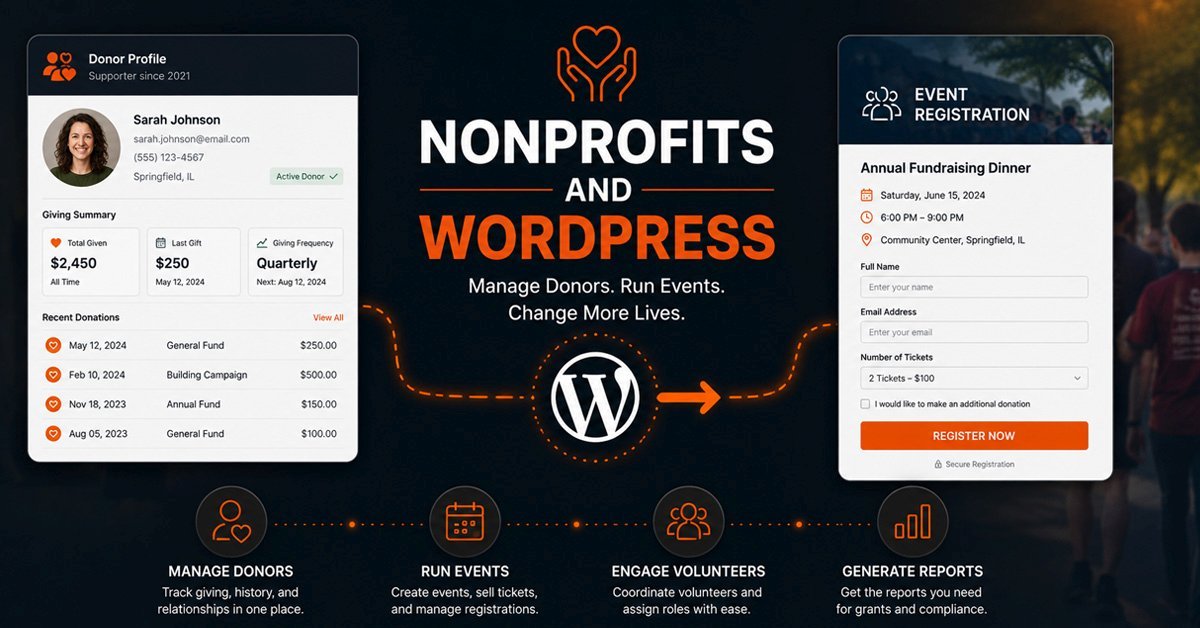
WordPress works well for nonprofits as a donor management and event platform when it is built with those specific workflows in mind. The key is treating donor records, event registration, volunteer sign-ups, and grant reporting as operational requirements that shape the architecture from the start, not features added later with a plugin stack that was never designed to work together.
The pattern we see most often with nonprofits is the same regardless of size. A small organization starts with a WordPress website built for presence. A donation button gets added. An events calendar gets installed. A contact form starts collecting volunteer inquiries. Within two years, the website is doing things it was never built to do, and doing them badly, because each piece was added reactively rather than planned as part of a coherent system.
This post is about what the right architecture actually looks like: how donor management, fundraising events, volunteer coordination, and grant reporting can all run through a well-built WordPress site, and where the limits of that approach are honest enough to acknowledge.
Why Nonprofits Have Different Website Requirements
A nonprofit website is not a business website with a donation button added. The operational requirements are fundamentally different in three ways that shape every architecture decision.
First, the relationship with visitors is ongoing rather than transactional. A donor is not a customer who makes a purchase and leaves. They give repeatedly, want to see the impact of their giving, need annual tax documentation, and expect communication that acknowledges the relationship. A website that treats each donation as an isolated transaction rather than a moment in an ongoing relationship loses donors over time without ever knowing why.
Second, the accountability layer is different. Nonprofits need to demonstrate how money was raised and how it was spent, not just for internal management but for grant compliance, board reporting, and public transparency. The data a nonprofit needs to export from its website is fundamentally different from what a business needs from its online store.
Third, the staff capacity is usually limited. Most nonprofits run lean. The person managing the website is often also managing communications, handling donor inquiries, and supporting events. The website needs to automate what can be automated: receipt emails, event reminders, volunteer confirmation messages, and donation acknowledgments. Every manual step in those workflows is a staff hour that could have gone toward mission.
Donor Management in WordPress
WordPress does not have a donor management system built in, but it can be extended to function as a lightweight CRM for donor records, giving history, fund designation, and automated communication. The key distinction is between plugins that process donations and plugins that manage donor relationships. Both matter, but they do different things.
Donation Processing vs Donor Management
Donation processing handles the transaction: collecting payment, routing it to the right bank account, and sending a receipt. Give WP, GiveWP, and Charitable all do this reasonably well within WordPress. Stripe and PayPal both integrate cleanly as payment processors. The receipt email is automatic. Fund designation, where a donor specifies whether their gift goes to general operations, a specific program, or a capital campaign, is configurable with the right setup.
Donor management goes further. It means having a record of each donor that accumulates over time: every gift they have made, every event they have attended, every piece of communication they have received. It means being able to pull a list of donors who gave last year but not this year and send them a targeted re-engagement message. It means generating a year-end giving statement for each donor with a complete list of their contributions for tax documentation.
WordPress handles donation processing very well and donor management at a basic level. If your donor base is under a few hundred active donors and your reporting needs are straightforward, WordPress is genuinely capable of managing both. If your donor management needs include complex segmentation, major gift tracking, grant funder relationship management, and integration with a back-office accounting system, a dedicated CRM like Bloomerang or Salesforce Nonprofit becomes the right answer, with WordPress serving as the public-facing site that feeds data into it.
Fund Designation and Restricted Giving
Many nonprofits receive restricted gifts: donations that must be used for a specific program, project, or purpose rather than general operations. Managing restricted giving correctly matters both for donor trust and for audit compliance. A donor who designates a gift to a specific program expects to see that program mentioned in their receipt and their year-end statement.
WordPress handles fund designation cleanly when configured correctly. GiveWP's fund designation feature lets donors select from a list of active funds at the point of giving. Each fund can have its own receipt template and reporting category. The data is exportable in a format that most accounting systems can import. This is not as sophisticated as a full nonprofit accounting system, but it handles the most common restricted giving scenarios without requiring a separate platform.
Recurring Donations and Retention
Recurring giving is the most valuable giving programme any nonprofit can build. A donor who gives monthly at a modest amount is more valuable over five years than a larger one-time donor who does not return. WordPress handles recurring donations well through Stripe's subscription billing, which manages the payment processing, failed payment recovery, and donor-facing management of their own recurring gifts.
Where WordPress needs additional configuration is in the communication layer around recurring giving. When a recurring gift fails, the donor should receive an automated email within 24 hours explaining what happened and how to update their payment method. When a recurring gift reaches its one-year anniversary, a thank-you message acknowledging the commitment matters more than most organizations realize. These automations require connecting WordPress to an email platform like Mailchimp or Mailpoet with the right triggers configured, but once set up they run without staff involvement.
Event Management for Fundraising and Community
Nonprofits run events differently from businesses. A fundraising gala has a ticket price, table sponsorships at different levels, donor recognition considerations, and a seating management requirement. A volunteer orientation has capacity limits, prerequisite sign-up questions, and confirmation communications. A community program has free registration, waitlist management, and reminder emails. These are all events, but they have almost nothing in common from a technical standpoint.
Fundraising Events and Ticket Tiers
A fundraising gala or annual dinner requires ticket management with multiple price tiers: individual tickets, table sponsorships, VIP packages, and staff or volunteer comps. It also requires donor acknowledgment at each level, since a table sponsor expects to see their name in the event programme and on the website's sponsor page. It requires a guest list that can be printed or exported for check-in. And it requires post-event receipts that clarify the tax-deductible portion of the ticket price, since a gala ticket that includes dinner is only partially deductible.
The Events Calendar combined with WooCommerce handles this reasonably well. Ticket tiers become product variations. Sponsorship levels get their own listing with their own confirmation email template. The guest list is exportable from WooCommerce orders. Post-event receipts require some custom configuration to include the correct tax language, but this is a one-time setup that applies to all future events of the same type.
Free Community Events and Volunteer Orientations
Free events with registration requirements are simpler from a payment standpoint but more complex in terms of the information collected. A volunteer orientation needs to know whether the registrant has previous volunteer experience, which shifts they can attend, and whether they have completed a background check. A community program might need to collect dietary restrictions, accessibility requirements, and emergency contact information.
Gravity Forms handles this kind of complex registration collection cleanly. Conditional fields show or hide based on previous answers. Multi-page forms break long registrations into manageable steps. Notifications route to different staff members based on the program selected. Capacity limits stop registrations when an event is full and switch to a waitlist automatically. Each of these is configurable without custom code, which matters for a nonprofit where the person configuring the form is not a developer.
Event Communication Sequences
The communication around an event matters as much as the event itself. A registration confirmation, a reminder three days before, a day-before logistics email, and a post-event thank-you with a donation ask are the minimum sequence for any significant nonprofit event. Each message has different content and serves a different purpose. Setting these up manually for each event is unsustainable. Automating them through a connected email platform means the sequence runs correctly for every registration without staff attention after the initial setup.
The connection between WordPress event registrations and an email platform like Mailchimp is straightforward to configure. The trickier part is making sure the right list segments are updated correctly, so that event attendees are tagged in a way that informs future communication rather than creating a one-off list that gets ignored after the event closes.
Volunteer Coordination Through WordPress
Volunteer management sits at the intersection of the website and internal operations in a way that most nonprofits handle manually long after a better approach is available. The website collects volunteer interest. A staff member exports the list, emails each person individually, coordinates availability, assigns roles, and follows up manually. Every step after the initial form submission is a candidate for automation that most organizations never get around to setting up.
A well-built WordPress volunteer system handles the full workflow. The application form collects availability, interests, skills, and any required certifications. An automated response goes immediately with next steps. Applications route to the volunteer coordinator with the relevant information already compiled. Approved volunteers receive a confirmation with their scheduled shift and any required preparation. Reminder emails go out automatically before each shift. Post-shift feedback forms go out automatically afterward.
None of this requires custom code. It requires careful configuration of Gravity Forms for the intake, a connected email platform for the sequences, and user roles in WordPress that give approved volunteers access to a restricted area with volunteer-specific resources like training materials, code of conduct documents, and event schedules. The setup time is real but the ongoing time savings are significant for any organization running a regular volunteer programme.
Grant Reporting and Data Exports
This is the area where WordPress either earns its place as a nonprofit operations platform or reveals its limits clearly. Grant funders require specific reporting: how many people were served, through which programs, with what outcomes, over what time period. If that data lives in WordPress, extracting it in the format the funder requires is either straightforward or painful depending entirely on how the data was structured when it was collected.
The nonprofits that use WordPress well for grant reporting are the ones that decided upfront what they needed to report and built the data collection accordingly. If a grant requires quarterly reports on program participation by demographic, the registration form for that program needs to collect the demographic data in structured fields, not as free text in a notes section. If a grant requires proof of community engagement through events, the event registration system needs to tag attendance by program area in a way that maps to the grant's reporting categories.
The nonprofits that struggle with grant reporting in WordPress are the ones that collected data in whatever format was convenient at the time and then tried to make it fit the reporting requirement after the fact. Free text, inconsistent field naming, and data spread across unconnected plugins all create export problems that require significant manual cleanup before the report can be submitted.
The WordPress Nonprofit Ecosystem: How It Connects
Membership Portals and Restricted Content
Many nonprofits have content that should not be publicly accessible: board meeting minutes, financial statements, staff resources, donor-only impact reports, and grant documentation. WordPress handles restricted content access well through user roles and membership plugins. A board member logs in and sees board documents. A major donor logs in and sees their personal giving history and a detailed impact report not available to the general public. A volunteer logs in and sees their shift schedule and training materials.
The access control layer in WordPress is flexible enough to handle most nonprofit scenarios without custom code. MemberPress and Restrict Content Pro both handle tiered access reliably. The more important question is whether the restricted content is worth the management overhead. A portal that is hard to update will not be updated. Board documents will fall out of date. The donor impact reports will stop being added. The portal will quietly stop delivering value while still existing on the site.
Build the member portal only for content that will genuinely be maintained. A simple board document library that gets updated monthly is more valuable than a complex portal that reflects good intentions at launch and becomes stale within six months.
WordPress vs Dedicated Nonprofit CRMs: An Honest Comparison
WordPress is not a replacement for a full nonprofit CRM in every situation. The comparison below is honest about where each approach works and where it does not.
| Requirement | WordPress (well configured) | Dedicated Nonprofit CRM |
|---|---|---|
| Donation processing and receipts | Excellent, Stripe and PayPal, automated receipts, fund designation | Excellent, built in by default |
| Recurring giving management | Strong, Stripe subscriptions handle most scenarios | Strong, with donor self-service portals |
| Donor relationship history | Adequate for under a few hundred active donors | Purpose-built, handles thousands of records cleanly |
| Major gift and prospect tracking | Limited, requires significant customization | Core feature of most platforms |
| Event registration and ticketing | Strong with The Events Calendar and WooCommerce | Varies by platform, often basic |
| Volunteer management | Strong with Gravity Forms and user roles | Available in some platforms, not all |
| Grant reporting exports | Good when data is structured correctly from the start | Built-in report templates for common funders |
| Email communication automation | Strong via Mailchimp or Mailpoet integration | Usually built in |
| Website and public presence | Full control, custom design, no platform limits | Template-constrained or requires separate website |
| Monthly platform cost | Hosting only after initial build | Ongoing subscription, often significant |
| Technical maintenance required | Yes, regular updates and monitoring needed | Managed by the platform |
| Data ownership | Full ownership, export anytime | Platform-dependent, some lock-in risk |
The practical conclusion: WordPress is the right operational platform for nonprofits whose donor base is manageable in size, whose events are central to their programme, whose volunteer coordination is a regular workflow, and who want to avoid ongoing platform subscription costs. A dedicated CRM becomes the right answer when major gift tracking, complex grant compliance reporting, and large-scale donor segmentation become the primary operational needs. The two are not mutually exclusive. Many mid-size nonprofits run WordPress as their public site and event platform while connecting it to a CRM that handles the donor relationship management at a depth WordPress cannot match.
Use Cases: What This Looks Like in Practice
What Gets Built Wrong Most Often
Donation forms that do not connect to anything. A donation is processed, a receipt is sent, and the donor's information sits in a plugin database that nobody looks at until year-end. There is no connection to the email platform, no donor record that accumulates over time, and no way to identify lapsed donors without a manual export and comparison. This is the most common setup and the one that costs the most in donor retention over time.
Events managed as blog posts. A blog post with an event date in the title is not an event management system. It has no registration capacity limits, no ticket pricing, no automated reminders, and no guest list export. It creates an archive of past event announcements that Google indexes but visitors find useless. Events need to be events: a proper post type with date, location, capacity, registration, and communication automation built around them.
Volunteer intake forms that collect the wrong information. A general contact form repurposed for volunteer sign-ups collects a name, email, and a message field where volunteers type their availability in free text. Nobody can search or filter that data. Every volunteer intake requires a staff member to read the message and manually record the information somewhere else. A properly structured Gravity Forms intake with specific availability fields, interest area checkboxes, and required certifications takes fifteen minutes longer to build and saves hours of manual processing for every cohort of volunteers.
No maintenance plan after launch. A nonprofit website with a donation system, event registration, volunteer intake, and restricted member content is a complex WordPress installation that needs regular updates, security monitoring, and backup management. Leaving it unmanaged is not a neutral choice. It is an accumulating security risk that will eventually create a problem at the worst possible moment. Our post on what a WordPress maintenance plan actually covers explains what ongoing care looks like for a site with this level of operational responsibility.
When WordPress Is Not Enough
Being honest about this matters more for nonprofits than for most organizations, because the cost of the wrong platform decision compounds over time in ways that are hard to undo.
If your organization manages relationships with major donors at a level where gift officer notes, prospect research, and relationship history between multiple staff members all need to be tracked, WordPress is not the right tool for that layer. It can still be your public site. It should not be your major gift management system.
If your grant reporting requirements involve complex outcome tracking, such as measuring program impact across multiple variables over multi-year periods, a purpose-built nonprofit CRM with grant management features will save your team significant time. WordPress can collect the intake data and feed it to that system, but trying to build custom outcome tracking in WordPress when a purpose-built tool exists is a poor use of development budget.
If your volunteer programme operates at a scale where shift management, background check tracking, and hour logging for grant compliance are daily workflows, a dedicated volunteer management platform handles those workflows more efficiently than a WordPress extension of Gravity Forms and user roles.
The honest bottom line is that WordPress is the right operational platform for the public-facing, donor-facing, and event-facing work that every nonprofit does. It is a solid foundation for smaller nonprofits who need all of their operations in one manageable place. It is a strong public platform for larger nonprofits who use it alongside a dedicated CRM. Our church and nonprofit web development service covers how we approach these architecture decisions for organizations at different stages of growth.
Frequently Asked Questions
Is WordPress good for nonprofit websites?
Yes, WordPress is well suited for nonprofit websites when built with the right architecture. Its plugin ecosystem covers donation processing, event management, volunteer intake, and restricted member content. Its content management system is manageable for non-technical staff. It gives nonprofits full ownership of their data and site without ongoing platform subscription costs. The most important factor is building with the specific operational workflows in mind from the start, rather than adding functionality reactively as needs arise. A well-built nonprofit WordPress site handles donor management, fundraising events, volunteer coordination, and grant reporting data collection more effectively than most organizations expect. Our broader guide on what church and nonprofit websites actually need covers the architectural decisions in more detail.
What is the best WordPress plugin for nonprofit donations?
GiveWP is the most widely used and consistently maintained WordPress donation plugin for nonprofits. It handles one-time and recurring donations, fund designation, automated receipts, donor management records, and year-end giving statement exports. It integrates cleanly with Stripe and PayPal and has add-ons for specific needs like peer-to-peer fundraising and fee coverage options. Charitable is a strong alternative with a slightly simpler setup for smaller organizations. The plugin matters less than the configuration. A well-configured GiveWP installation with the right fund structure, receipt templates, and email platform integration outperforms a more complex plugin that was installed and left with default settings.
Should a nonprofit use WordPress or a dedicated platform like Bloomerang or Salesforce?
The honest answer is that the right choice depends on the size of the donor base and the complexity of the relationship management required. WordPress handles donation processing, event management, volunteer coordination, and basic donor records very well. It is the right choice for organizations with a manageable donor base, active event programmes, and a need to avoid ongoing platform subscription costs. A dedicated CRM like Bloomerang or Salesforce Nonprofit becomes the right answer when major gift tracking, complex prospect management, and grant compliance reporting become the primary operational needs. These two approaches are not mutually exclusive. Many nonprofits run WordPress as their public site, event platform, and member portal while connecting it to a CRM for the deeper donor relationship management. Our post on what to look for before hiring a WordPress developer for your nonprofit or church covers how to evaluate whether a developer understands these distinctions before you engage them.